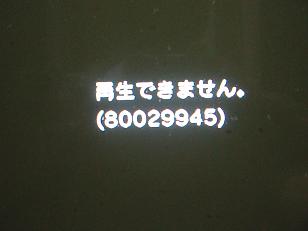
Okay guys (& gals) here's a guide to help us out decipher some of those cryptic error codes we get sometimes and figure out what they mean...
Hey, at least a hexadecimal combination is better then 3 rotating ring of light 
80029945 - Can’t playback burn BDr movie (error message in the picture above).
710102 - DNS Error; No DSN server available.
8013030 - System Error due to failed update download.
80010001 - Major Error , Game ability stopped.
80010017 - Can't start Blu-Ray Game.
80010510 - Will not play hard drive games - Cause unknown.
80010516 - An error occured during the start operation; Ps1 game swapped using the eject function and then play pressed quickly, ps1 game inserted again.
80029023 - Exchanging Key Information exchange has timed out.
80029024 - "Cannot Obtain an IP address".
80029564 - Downloaded Game will not install - Cause unknown
80030920 - An error occurred during the copy operation. The file may be corrupt or there isnt enough memory. Try copying data from original source.
80031150 - System Settings Fail to Save - Possible Blue Screen "Setting information is corrupted.
80031601 - Error Creating Account.
80130203 - PS3 connects to internet but not to network - Typically means that the required ports are.
80410418 - DNS Error.
80710016 - Playstation Network is down.
80710092 - "An error has occured. you've been signed out from the ps network" - (connection dropped).
80710101 - Conneciton error.
80710102 - IP conflict , PS3 Cannot connect to the router with current IP information - Try rebooting your router.
8071040C - The PSN is handling too many connections, reboot PS3 and try again.
80710541 - The connection to the server timed out. ss the x button to repair and restore default".
80710723 - Possible Port Error - Try opening ports , TCP port: 80, 443, 5223 and UDP port: 3478, 3479, 3658. or add PS3 to DMZ.
81019002 - Error copying saves from location A to location B not open to connect to store but PS3 can connect to internet.
8001050B - Will not play demo hard drive games, when blue-ray disc is inserted - Cause unknown.
8001050D - An error occured during the start operation; Ps3 game swapped using the eject function and then play pressed quickly - ps3 game inserted again.
80028EA5 - Unknown?? User cannot connect to PS3 network. Sony told the user to send the machine in.
80028ea6 - Connection error , Possible Proxy error power cord. Then shut off your modem/router, for about 5 mintues, then turn the modem back up first and let it sync, then turn the router back on(if using one) and let it sycn. Reconnect your power cable and flip the back swtich up again. Then make a new network connnection.
80028F10 - Go to Display Settings then HDMI (or whatever your connection is) and choose Automactic.
80028f17 - Ps2 disc Boot Error , An error occured during the start operation; Ps2 game swapped using the eject function and then play pressed quickly - Backup ps2 game inserted again (ps3rips).
80028F18 - Ps2 Disc Error, unsupported disc; eg. Utility discs, BB discs, IQ Remix game etc. ode).
80028F19 - PS2 Disc Error , fsck; the internal PS2 disk got corrupted and I guess that you can use HDD utility disc to fix it.
80028F1A - Ps2 Disc Error , invalbnnetcfg; network config error.
80029C68 - Corrupt data usually on external device.
8002A10D - Unable to Add friend in XMB.
8002A4A6 - Cannot load game to play online.
8002A515 - Error Signing in.
8002A548 - Unable to remain logged in - either to game or server.
8002A705 - Unable to connect to server/host. Check router port configuration.
8002a71A - Possible NAT Error , Can log onto Game Server but can't join game and can't host game.
8002b241 - DVI has no audio.
8002F994 - To many people downloading the update just sit back until the morning around 5am - 11am and you should be able to get it.
8002F997 - Trying to Update the Firmware, copying to a file and installing from a USB drive falied".
8003051E - Game will not Save.
8013013D - "A connection error has occurred" - May be to do with the SSID of the Router or signal strength if the conneciton drops Putting the PS3 into DMZ may help - otherwise check WPA key Ps3 can't handle WPA2 only WPA or none.
8013013E - WEP Key error, change WEP key to all numbers (on router homepage) and try agian, or which to WPA. - Otherwise disable security.
8013030F - Check Router Page, SSID Broadcasting possibly off.
8013030F - Access Point not detected.
80410A0B - Internal PSP error, hardware fault. Send back to be replaced/fixed.
807101FF - An error occurred during communication with the server. This is a DNS error.
8071053D - Hard boot the PS3, turn off the PS3 to stand-by, flip off the back swtich and remove the power cable. Plaug everything back in and reboot.
80710B23 - PS3 Network is Down or PS3 Network is too busy to respond.
80710D23 - Turn the PS3 off for a bit (30 minutes give or take) with the power toggle (not standby XMB or touch button).
80029513 - Copyright Violation when attempting to install game.
8002AD23 - Found to be related to a connection issue Check to make sure firewall is off to see if that helps. (possibly network/update error).
80010514 - Disc error detected. Retrying operation.
80010036 - an error occured during the delete operation error.
80010014 - Has to do with downloading from the PSN, When you have bought a game and this error occurs, please go to your "recently downloaded/purchases" to download it first try.
8002F147 - Cannot update the firmware, Possible solutions, turn off proxys, try not using a firewall, and/or turn off UnuP support.
15/08/2008
1193 Views
32 Votes
Join MyPS3 to vote for your favourite story!
Source URL:
http://boardsus.playstation.com/playstation/board/message?board.id=ps3&thread.id=1857127&view=by_dat